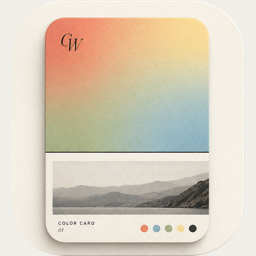
Make a color card from a photo
A free, simple version of ColorWander’s classic card: your photo, a band of its colors, five swatches and a caption you type. Download it as a JPEG.
Your photo stays in your browser — nothing is uploaded.
How to use it
- Choose or drop a photo.
- Type a caption — a place, a time, a word.
- Download the card.
About this card
It’s 1080 × 1440 px — the 3:4 ratio that suits Xiaohongshu and portrait posts. The band uses the two strongest colors of your photo, and the caption color switches automatically for contrast.
More layouts in the app
The app has 28 layouts — tickets, postcards, calendars, stamps, Polaroids, perler beads — and writes the place and time for you. See them all.
Make your first color cardFree on iPhone & iPad · iOS 16 or later